Brian Velazquez Project # 4 1/20/17
In this project what we had to do was create are own business card by using our own logos and are own information. The objective of the project was to teach use how to create are own business so we can use it in the future in jobs we may have. I completed this project by using two different software's
including Photoshop, and InDesign and my own logo which I drew. After I drew my logo I made it digital to improve on the logo on Photoshop after improving my logo a I went to InDesign to make a format for my business card after creating the format I added my logo and information to it and printed it and completed my project.
The software's we used was Adobe Photoshop CS6 and Adobe InDesign CC. This is relevant to web design because in the future we will use this cards to spread are businesses and give us more job opportunity's. I see myself using this in the future to spread my own business and to help me and my job to spread.
Sunday, January 22, 2017
Project 3 Reflection Journal
Brian Velazquez Project # 3 12/21/16
In this project what we did was we were given a photograph of two twin girls that was horribly water damaged what we had to do was fix this photo to try to make it seem as if it never had water damage before. The objective of the lab was to improve our skills in fixing and renewing photographs that have received damage. I completed this lab by using certain tools to remove the water damage we used tools such as the patch tool, clone stamp tool, and other tool we used in lab 8. We used those tools to get rid of the damage on the girls faces, hair, arms and etc.
The software that was used to complete this project was Adobe Photoshop CS6. This is relevant to web design because some photos that you will use will sometimes have damage on it and you will need to make it look brand new to be able to use it online or on websites. I see myself using these skills in the future for websites and to make photos look as if the have never received damage ever before. This is what project 3 was about and what needed to be done in it.
In this project what we did was we were given a photograph of two twin girls that was horribly water damaged what we had to do was fix this photo to try to make it seem as if it never had water damage before. The objective of the lab was to improve our skills in fixing and renewing photographs that have received damage. I completed this lab by using certain tools to remove the water damage we used tools such as the patch tool, clone stamp tool, and other tool we used in lab 8. We used those tools to get rid of the damage on the girls faces, hair, arms and etc.
The software that was used to complete this project was Adobe Photoshop CS6. This is relevant to web design because some photos that you will use will sometimes have damage on it and you will need to make it look brand new to be able to use it online or on websites. I see myself using these skills in the future for websites and to make photos look as if the have never received damage ever before. This is what project 3 was about and what needed to be done in it.
Lab 8 Reflection Journal
Brian Velazquez Lab #8 Editing Tools 12/16/16
In this lab what we did was use different editing tools on different images to remove or change certain things in the images such as removing graffiti or removing wrinkles from someones face. The objective to this lab was to teach us how to use these tools to remove and fix images and improve on them. I completed this lab by using different editing tools such as the patch tool, clone stamp tool and others as well to remove certain things from the images such sprinklers from one graffiti from another, also we used tools to change certain things from a image such as darkening half a image a lighting the other half this is how we completed the lab. \
The software I used to complete this lab was Adobe Photoshop CS6. This is relevant to web design because one time in the future we may need to fix an image or remove something from an image to add it to the internet of a website and more. I see myself using these skills in the future to fix images and remove certain things from it depending on the circumstances.
In this lab what we did was use different editing tools on different images to remove or change certain things in the images such as removing graffiti or removing wrinkles from someones face. The objective to this lab was to teach us how to use these tools to remove and fix images and improve on them. I completed this lab by using different editing tools such as the patch tool, clone stamp tool and others as well to remove certain things from the images such sprinklers from one graffiti from another, also we used tools to change certain things from a image such as darkening half a image a lighting the other half this is how we completed the lab. \
The software I used to complete this lab was Adobe Photoshop CS6. This is relevant to web design because one time in the future we may need to fix an image or remove something from an image to add it to the internet of a website and more. I see myself using these skills in the future to fix images and remove certain things from it depending on the circumstances.
Friday, December 9, 2016
Lab 7 Reflection Journal
Brian Velazquez Lab #7 Filters 12/01/16
What we did in this lab was we selected 2 photos and with one of them we copied it 5 times. After that we used different filters for each of the photos to make them look different. The objective of the lab was to have a different filter for each of the photos making them unique. We did this lab by using the filter gallery to find the filters we wanted to use.
The software we used for the lab was Photoshop CS6. This is relevant to web design because it can change pictures to make them unique and different then other. I see myself using these skills in the future for changing how pictures look and even change things in picture.
What we did in this lab was we selected 2 photos and with one of them we copied it 5 times. After that we used different filters for each of the photos to make them look different. The objective of the lab was to have a different filter for each of the photos making them unique. We did this lab by using the filter gallery to find the filters we wanted to use.
The software we used for the lab was Photoshop CS6. This is relevant to web design because it can change pictures to make them unique and different then other. I see myself using these skills in the future for changing how pictures look and even change things in picture.
Lab 6 Reflection Journal
Brian Velazquez Lab #6 Vector Shapes 11/28/16
In this lab what we did was similar to lab 5 but instead of using colors we decided to use shapes to fill in our drawings. The objective of the lab was to get us acquainted with the shapes and different ways how to use them. We completed this lab by using the shape tool to match the shapes we used in the drawings to fill them in with color and shape. The drawing will be in the right.
The software we used to complete this lab was Photoshop CS6. This is relevant to Web Design because in the future we might use different pictures and need to fill it in with shapes. I see myself using these skills in the future to fill in different images with different shapes.
In this lab what we did was similar to lab 5 but instead of using colors we decided to use shapes to fill in our drawings. The objective of the lab was to get us acquainted with the shapes and different ways how to use them. We completed this lab by using the shape tool to match the shapes we used in the drawings to fill them in with color and shape. The drawing will be in the right.The software we used to complete this lab was Photoshop CS6. This is relevant to Web Design because in the future we might use different pictures and need to fill it in with shapes. I see myself using these skills in the future to fill in different images with different shapes.
Lab 5 Reflection Journal
Brian Velazquez 11/27/16
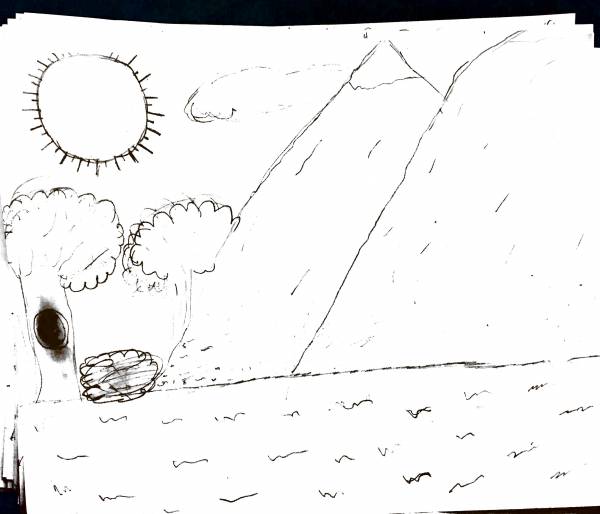
In this lab what we did first was draw a picture in 10 minutes. After that we had to use photoshop to color our drawings. The objective of this lab is to teach us how to use the brush tool to color in and fill our drawings. We completed this lab by using multiple tools such as the brush tool to color in our drawings and the quick selection tool to keep the color inside the lines to were it belongs.The picture I drew is to the right.
The software I used was Photoshop CS6. This is relevant to Web Design because we might use the tools we used for lab in future photos we can color and fill it in. I see myself using these skills in the future to make photos look better and mix and match colors.
Brush Tool Lab
In this lab what we did first was draw a picture in 10 minutes. After that we had to use photoshop to color our drawings. The objective of this lab is to teach us how to use the brush tool to color in and fill our drawings. We completed this lab by using multiple tools such as the brush tool to color in our drawings and the quick selection tool to keep the color inside the lines to were it belongs.The picture I drew is to the right.The software I used was Photoshop CS6. This is relevant to Web Design because we might use the tools we used for lab in future photos we can color and fill it in. I see myself using these skills in the future to make photos look better and mix and match colors.
Sunday, November 20, 2016
Lab 4 Reflection Journal
Brian Velazquez
In this lab what we had to do was use the photos that we took on the photography hike with the camera and choose six of those photos to use. The photos we had to choose were are suppose to be a close up, high point, low point, landscape, eye level shot, and camera angle. The objective of the lab is to get us to learn how to use a camera and how to take good pictures and in different angle. I did the lab by going on a hike in flushing meadow park and taking many different pictures and even standing in one place and taking many different pictures of different things.Then choosing out of those photos the 6 I thought were the best for those catergories. And putting them in rows with each other.
The software I used was Adobe Photoshop CS6. This is relevant to web design because in web design we will be working with many different images. I see myself using these skills in the future when working with different images to do a lab or project.
In this lab what we had to do was use the photos that we took on the photography hike with the camera and choose six of those photos to use. The photos we had to choose were are suppose to be a close up, high point, low point, landscape, eye level shot, and camera angle. The objective of the lab is to get us to learn how to use a camera and how to take good pictures and in different angle. I did the lab by going on a hike in flushing meadow park and taking many different pictures and even standing in one place and taking many different pictures of different things.Then choosing out of those photos the 6 I thought were the best for those catergories. And putting them in rows with each other.
The software I used was Adobe Photoshop CS6. This is relevant to web design because in web design we will be working with many different images. I see myself using these skills in the future when working with different images to do a lab or project.
Subscribe to:
Posts (Atom)